Discover simple and effective ways to write better ChatGPT prompts for content writing, productivity, brainstorming, research, and business tasks.
Most people blame ChatGPT when the answer is weak. The truth is usually simpler. The prompt was vague, and the tool gave back exactly what it was asked for. The fastest way to get smarter, more useful answers is not a secret model or a paid upgrade.
It is learning how to write better prompts for ChatGPT. When you say clearly what you want, who it is for, and how you want it delivered, the quality jumps right away.
This guide breaks down the craft of prompting into simple, repeatable steps, with plenty of real before and after examples you can copy. Whether you write emails, run a small business, study, or build marketing campaigns, these techniques will help you get more out of every message you send.
Why Better Prompts Matter So Much
Good prompting is the difference between a tool that wastes your time and one that saves it. A widely cited MIT study found that people using ChatGPT for common writing tasks finished 40% faster, and the quality of their work actually rose by 18%. Those gains do not come from typing “write me something.” They come from giving the tool enough to work with.
OpenAI’s own research backs this up. Its large study of how people use ChatGPT found that writing is the single most common task, and that most writing requests are people asking it to improve or edit text rather than create it from scratch.
In other words, the best results come from people who guide the tool, not those who hope it reads their mind. That is the heart of why learning to write better prompts for ChatGPT pays off.
The Simple Formula for a Strong Prompt
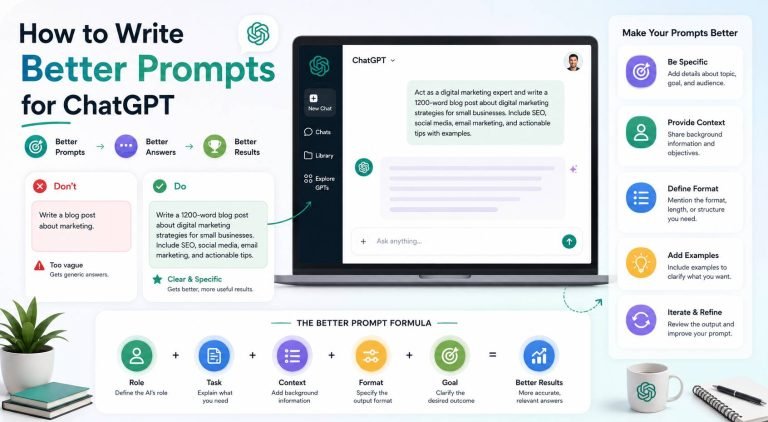
You do not need to memorize a hundred tricks. Most great prompts include four things. Think of it as Role, Context, Task, and Format.
- Role: Tell ChatGPT who to be. “Act as a hiring manager” gives sharper feedback than no role at all.
- Context: Share the background. Who is the audience? What is the goal? What have you already tried?
- Task: State exactly what you want done, in plain language.
- Format: Say how you want it. A short email, a bulleted list, a table, three options, under 200 words.
Here is the formula in action. Watch how much the answer improves.
Weak: Write a cover letter.
Strong: Act as a career coach. I am applying for a marketing coordinator job at a software company in Denver. Here is the job description and my resume. Write a one page cover letter that highlights my social media results, sounds confident but not arrogant, and matches the friendly tone of the company. Keep it under 300 words.
The weak version gives you something generic. The strong version gives you something you can almost send. Once this becomes a habit, you will write better prompts for ChatGPT without even thinking about it.
Eight Techniques That Instantly Improve Your Prompts
Layer these on top of the basic formula whenever you want sharper results.
1. Be specific about what you want
Replace fuzzy words with details. Instead of “make it better,” say “make it shorter, friendlier, and easier for a customer to understand.” The clearer the target, the closer the first draft lands.
2. Show an example
If you want a certain style, paste one or two samples first. “Write three product descriptions in the same voice as these examples.” Showing beats describing nearly every time. A small business owner can paste a favorite past email and say “match this tone.”
3. Give it a role
Telling ChatGPT to act as a specific person changes the answer. “Act as a skeptical investor” produces tougher questions about your pitch than a neutral request ever will.
4. Define the audience
The same topic should sound different for a CEO, a new customer, or a fifth grader. Say who the reader is. “Explain this to a busy client who is not technical” shapes the whole response.
5. Set clear constraints
Limits make answers better. Word counts, reading levels, what to include, what to avoid. “Under 150 words, no jargon, end with a clear call to action” keeps the tool on track.
6. Ask for step by step reasoning
For anything involving logic, math, or planning, add “think it through step by step.” It tends to produce more careful, accurate answers when it works through the problem instead of jumping to a conclusion.
7. Hand over your rough draft
Some of the best results come from editing, not creating. Paste your messy notes and say “turn this into a clean, professional version.” Since most people get the most value from editing anyway, this plays to the tool’s strength.
8. Ask it to ask you questions
When a task is complex, try “before you answer, ask me any questions you need to give the best result.” This flips the work back to you in a smart way and fills the gaps you forgot to mention.
A Reusable Prompt Template You Can Copy
Keep this handy and fill in the blanks for almost any task.
Act as a [role]. I need help with [task]. Here is the background: [context, audience, goal]. Please deliver the answer as [format and length]. Keep the tone [tone]. Avoid [anything you do not want].
Filled in, it might look like this.
Act as a friendly customer support rep. I need help replying to an upset customer whose order arrived late. Here is the background: she is a repeat buyer, the delay was our fault, and we want to keep her business. Please deliver the answer as a short email under 120 words. Keep the tone warm and apologetic. Avoid corporate jargon.
Prompt Examples for Common Tasks
Save these and adjust them to your own work. They cover the jobs people repeat most often.
- Email reply: Here is an email I received. Draft three replies, one warm, one neutral, one firm, each under 100 words.
- Shorten anything: Rewrite the text below so it is half as long, keeps every key point, and sounds natural.
- Explain simply: Explain [topic] like I am smart but new to it. Use one everyday analogy and keep it under 200 words.
- Compare options: Compare [option A] and [option B] in a table, then tell me which fits a small business on a tight budget and why.
- Plan a project: Break this goal into a clear plan with steps, owners, and a realistic timeline. Flag the biggest risk.
- Brainstorm: Give me 20 ideas for [topic], then group them and pick the best five with a short reason for each.
- Fix a formula: Write an Excel formula that flags any invoice more than 30 days overdue, and explain how to use it.
How to Refine an Answer You Do Not Love
The first answer is a starting point, not the finish line. The real skill is the back and forth. Try these follow ups.
- “Make it more casual.”
- “That is too long. Cut it to three sentences.”
- “You missed the budget point. Add it.”
- “Give me a version for LinkedIn and one for email.”
- “Rewrite this as if you were talking to a friend.”
A real estate agent in Phoenix can turn a stiff listing description into a warm, scroll stopping one in two or three quick rounds. Each follow up steers the tool closer to what you actually pictured.
Set It Up Once So Every Prompt Starts Stronger
You can save yourself from repeating context in every message. In Settings, fill in your custom instructions with who you are and how you like answers.
Example: I run a bakery in Austin and write for a US audience. Keep answers short and practical, give me real examples, and skip the filler.
Turn on memory too, so ChatGPT remembers your job, your style, and your projects across conversations. With the basics already in place, every new prompt you write starts a few steps ahead.
Common Prompt Mistakes to Avoid
These habits quietly tank your results.
- Being vague. “Help me with marketing” gives the tool nothing to aim at.
- Cramming five jobs into one prompt. Break big tasks into steps. Outline first, then draft each part.
- Skipping the format. If you do not say how you want the answer, you get whatever it picks.
- Giving up after one try. The magic is in the second and third pass.
- Leaving out the audience. Who reads this changes everything about the answer.
One Rule No Prompt Can Replace: Check the Facts
Even a perfect prompt cannot guarantee a true answer. ChatGPT can sound completely confident and still be wrong. It may invent statistics, sources, or dates. Use it to draft, organize, and brainstorm, then verify any fact, figure, or claim before you publish or send it. Better prompts get you a better draft, not a free pass on accuracy.
Frequently Asked Questions
What makes a good ChatGPT prompt?
A good prompt gives a role, context, a clear task, and the format you want. The more relevant detail you include, the better the answer, which is the core idea behind learning to write better prompts for ChatGPT.
Why are my ChatGPT answers so generic?
Usually because the prompt is too broad. Add who the answer is for, what the goal is, and how you want it formatted, then refine the first draft with follow up requests.
Should I tell ChatGPT to act as someone?
Yes. Assigning a role, like a coach, editor, or skeptical customer, shapes the tone and focus of the answer and almost always improves it.
How long should a prompt be?
As long as it needs to be to include the role, context, task, and format. A few clear sentences usually beats a single vague line.
Can I save prompts to reuse?
Yes. Keep a simple note of the prompts that work well for you. Over time you build a personal library that turns repeat tasks into quick wins.
Final Thoughts
You do not need to be technical to write better prompts for ChatGPT. You just need to be clear. Tell it who to be, give it the background, state the task, and say how you want the answer. Then treat the first draft as a starting point and refine from there. Do that, and the tool stops feeling random and starts feeling like a sharp assistant who gets you. Pick one task you do every week, rewrite your usual prompt using the formula in this guide, and watch the answer get noticeably smarter. That single change will do more than any other tip on this page.
Published By Meedium.